When Apple released the 2021 iMac in 6 colors, it had a cute feature. The default theme/accent color was a special one that matched the color of the device. This continued with a slightly tweaked set in 2024 when the line was refreshed.
I saw during the Macbook Neo press event that they also had unique matching colors in the UI. I managed to figure out which IDs are which, so here a list for anyone interested. The Macbook Neo colors require 26.3.1 or greater.
Instructions
- Open Terminal
- Run
defaults write -g NSColorSimulateHardwareAccent -bool YES - Run
defaults write -g NSColorSimulatedHardwareEnclosureNumber -int 0, with the0replaced with a number from the below image. - Restart programs for them to update. A full reboot is the cleanest.
killall Finder Dockwill handle the Dock, Menu Bar, and Finder without a reboot.
Note: It's annoying to convey, but despite the 2024 iMac colors looking identical in this list, some UI elements (progress bars, checkboxes, etc) render with a more pastel color. In most places they do look identical, however.
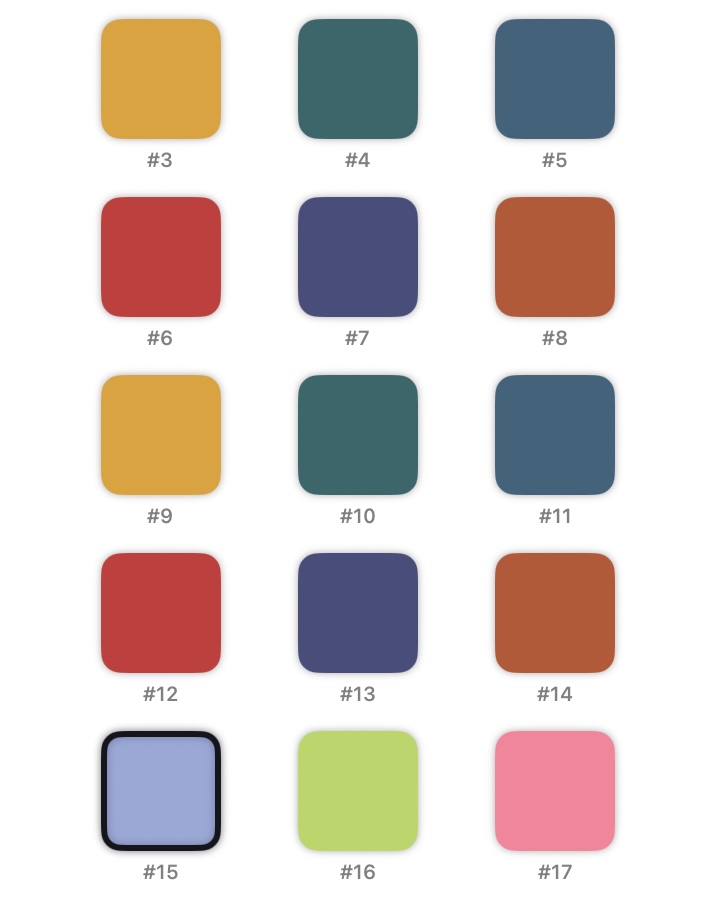
Presumably next time a new model comes out, it will pick up with #18.